Pages can be grouped in two ways: a collection holds pages of one topic, and a sub-page nests one page under another.
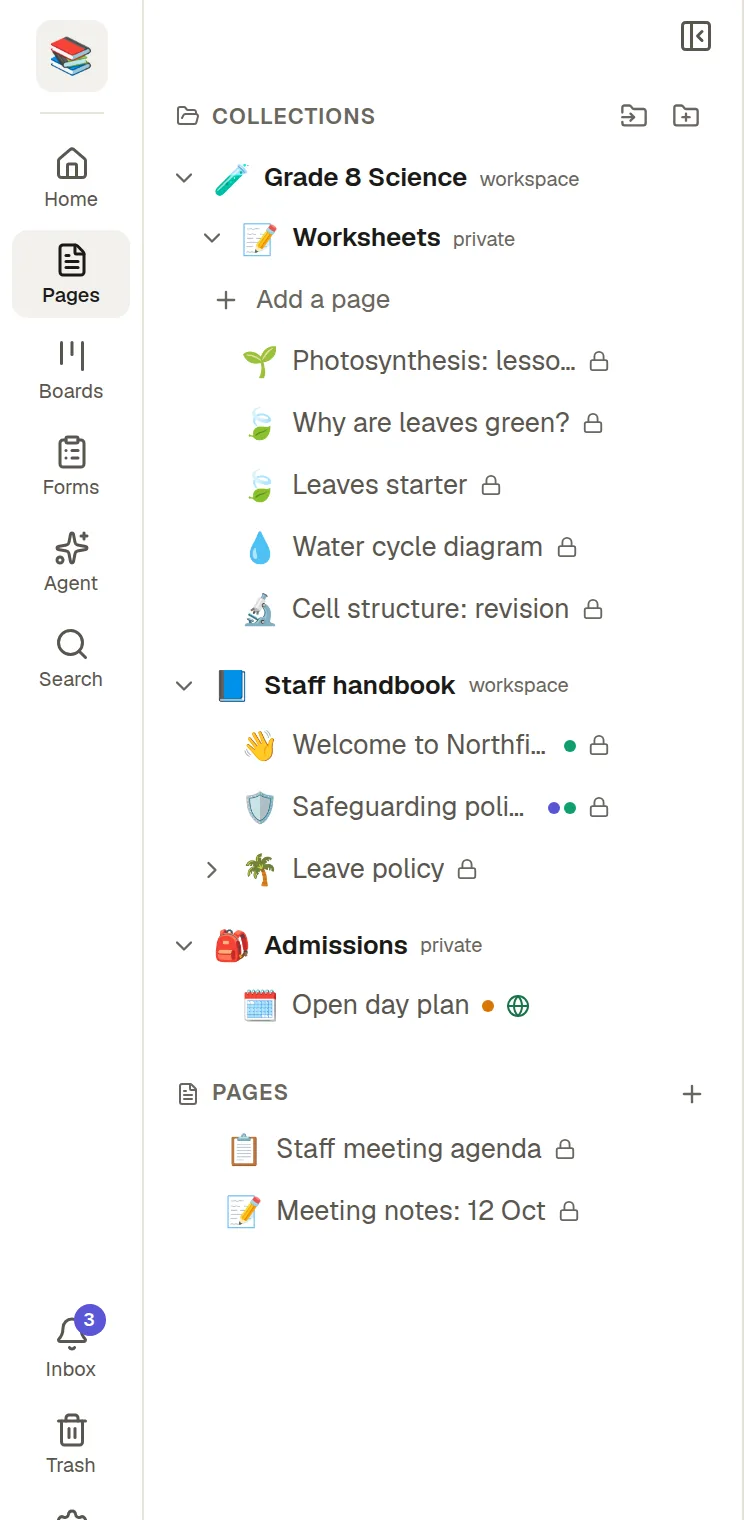
Collections
A collection is a folder for related pages, such as Product, HR or Clients. Collections appear in the Pages panel with their pages underneath. Collections can also hold other collections.
Create one
Click Pages in the rail.
In the Pages panel choose the + next to Collections, or use New collection.
Give it a name and an icon, then create it.
Add a page to a collection with the + on the collection's row, or New page here from its menu.
What a collection can do
Share all its pages at once. See 🤝 Share a page or a collection.
Publish as a small website. See 🌐 Publish to the web.
Export with all its sub-collections as one file from its ⋯ menu, and import one back as a new collection.
Nest inside another collection. Sharing a collection shares everything inside it, sub-collections included.
If you delete a collection, its pages are not deleted. They move to the top level of Pages.
Sub-pages
A sub-page is a page inside another page. Open the parent page's ⋯ menu and choose Add sub-page, or type /sub-page in the text. In the Pages panel, a page with sub-pages shows an arrow to open or close them.
Nesting can go as deep as you need. In the address bar a sub-page shows only its collection, never the whole chain of parents, so moving a page does not break its links.
Pages without a collection
You do not have to use collections. A page created under Pages and not inside a collection sits at the top level on its own.
The page you have open is always visible in the panel. NoteMaker opens the collections and parent pages above it, even when you arrive from search.