Move your pages out of Notion and into a NoteMaker collection. You connect your Notion account, pick the pages and databases you want, and NoteMaker brings them over in the background.
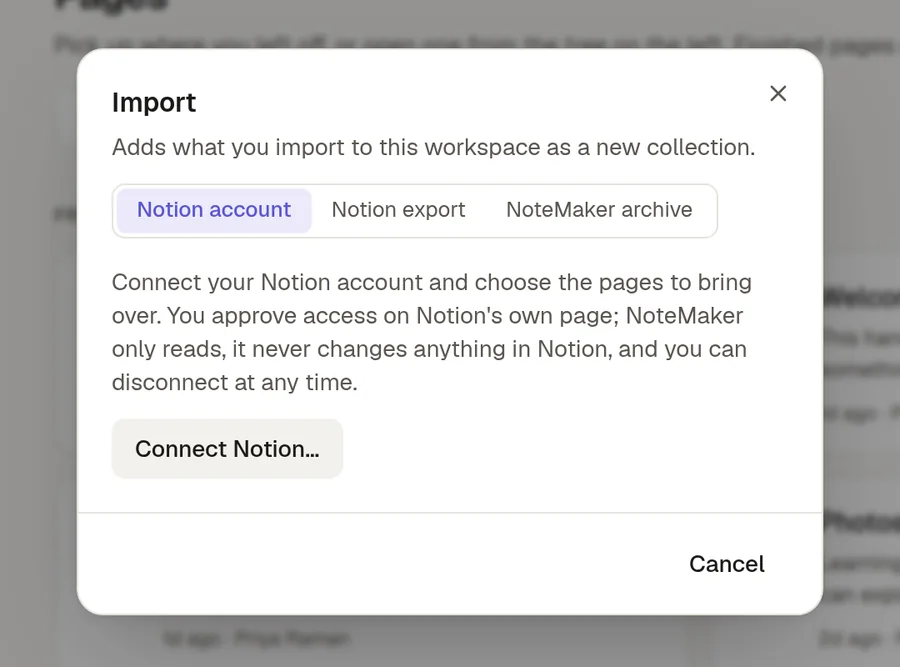
Open the Import window
In the Pages panel, click the import icon in the header (Import collection…). To add what you import inside an existing collection, open that collection's ⋯ menu and choose Import archive here….
Choose Notion account. What you import arrives as a new collection, or as a sub-collection when you started from a collection's menu.
Connect Notion and import
Choose Connect Notion…. You approve access on Notion's own page. NoteMaker only reads from Notion and never changes anything there, and you can Disconnect at any time.
Tick the pages and databases to bring over. Use the arrow beside one to open its sub-pages. If a page is not listed, for example one in a team space, paste its link into the box to add it.
Give the collection a name. It starts as "Notion import".
Choose Import.
Each person connects their own Notion account, so you only see and import what your Notion account can open.
What comes across
Sub-pages, with the same nesting, and the pictures and files in them.
Links between the pages you import, which keep working.
Callouts, tables, lists, headings, to-dos and code.
Databases. If your plan includes Sheets, a database becomes a sheet with typed columns and all its rows. Otherwise it becomes a page with a table of its rows, plus a page for each row that has content of its own.
What does not come across exactly
Toggles and columns are flattened: a toggle becomes a bold line with its content below it, and columns become one after another.
Equations become code blocks.
Bookmarks and buttons cannot be imported, because Notion does not pass their links on.
Links to pages you did not import stay as plain text or as links back to Notion.
Sharing, comments, page history and people do not come across. Every page arrives private to you, and you own it. Share them afterwards.
While it runs
The import is queued and runs in the background. You get a notice when it finishes, and Settings → Transfers shows its progress and the full list of what changed. Once it has started it cannot be cancelled. If it fails, everything it created is removed again, so you never end up with half an import.
If a collection with the same name already exists, the new one gets a number, such as "Notion import (2)".
Limits
Notion imports use the same transfer limits as collection exports and imports: the number of pages and the size per import, and how many transfers can run in a day. Pictures and files count toward your workspace's storage. See 📦 Export and import a collection.